

This project takes one application through three environments, each closer to production than the last: a plain VM for a quick manual test, a Docker container deployed by a CI/CD pipeline, and finally a Google Kubernetes Engine (GKE) cluster. Terraform builds the infrastructure for all three, and Jenkins runs the pipelines.
The code is in 3-tier-architecture-deployment-GKE.
The application #
The app is YelpCamp, a Node.js campground review site. It has three tiers:
| Tier | What | Where |
|---|---|---|
| Presentation and application | Express server rendering pages and handling requests | The environment being deployed (VM, container or GKE) |
| Data | User and campground data | MongoDB Atlas (managed) |
| External services | Image storage, maps | Cloudinary, Mapbox |
It needs four sets of credentials to run: Cloudinary (images), a Mapbox access token, a MongoDB Atlas connection string, and a session secret. Every environment has to supply them.
Architecture #
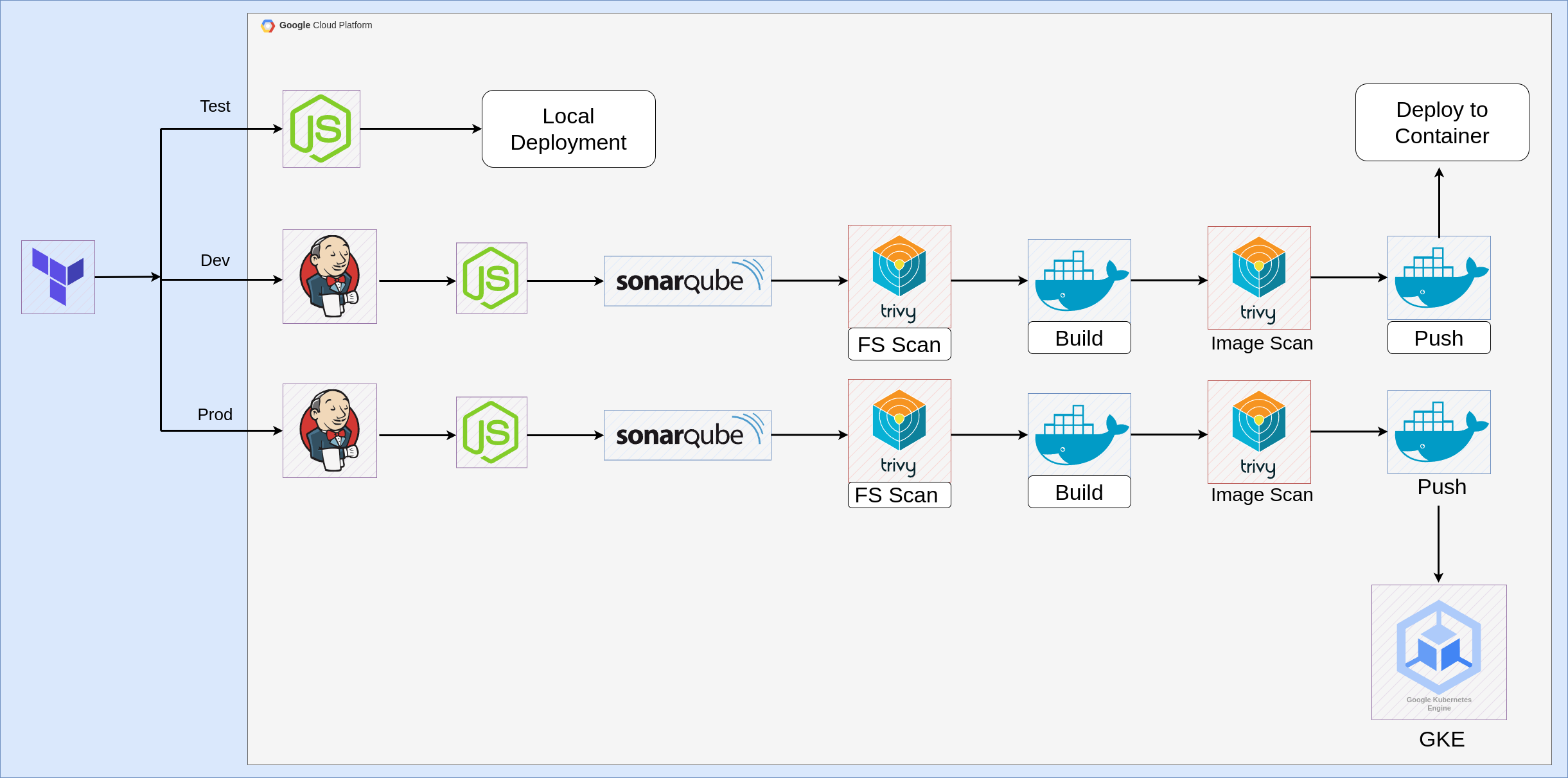
| Environment | Purpose | How the app runs |
|---|---|---|
| Test | Check the app works at all | npm start on a small VM |
| Dev | Build, scan and run the app as a container through CI/CD | docker run on the Jenkins VM |
| Prod | Deploy the same image to Kubernetes | A Deployment on GKE |
The Terraform code is split into reusable modules (network, firewall, compute, GKE), and each environment has its own folder that composes them:
Infra
├── environments
│   ├── dev
│   ├── prod
│   └── test
├── modules
│   ├── compute
│   ├── firewall
│   ├── gke
│   └── network
├── scripts
│   ├── jenkins.sh
│   ├── nodejs.sh
│   └── sonarqube.sh
├── main.tf
├── variables.tf
├── providers.tf
└── outputs.tf
k8
└── deployment.yaml
The root module creates the shared VPC and firewall rules. Then each environment is applied separately:
git clone https://github.com/ChetanThapliyal/3-tier-architecture-deployment-GKE.git
cd 3-tier-architecture-deployment-GKE/Infra
# create a terraform.tfvars for the root and for each environment
terraform init && terraform apply

cd environments/test
terraform init && terraform apply
# repeat for dev and prod
All three environments share one VPC and one set of firewall rules. The rules open SSH (22), HTTP and HTTPS (80, 443), SMTP for Jenkins email (465), 6443, the application range (3000–10000) and the Kubernetes NodePort range (30000–32767). Startup scripts install Node.js, Jenkins, Docker, Trivy and SonarQube when each VM first boots.
Test environment #
The test VM is an e2-small with a 10 GB disk. Its startup script installs Node.js (through nvm) and clones the project. To run the app, I added the credentials to a .env file and started it:
export NVM_DIR="/opt/nodejs/.nvm" && source "$NVM_DIR/nvm.sh"
cd /opt/3-tier-architecture-deployment-GKE
vi .env   # CLOUDINARY_CLOUD_NAME="...", MAPBOX_TOKEN="...", DB_URL="...", etc.
npm start
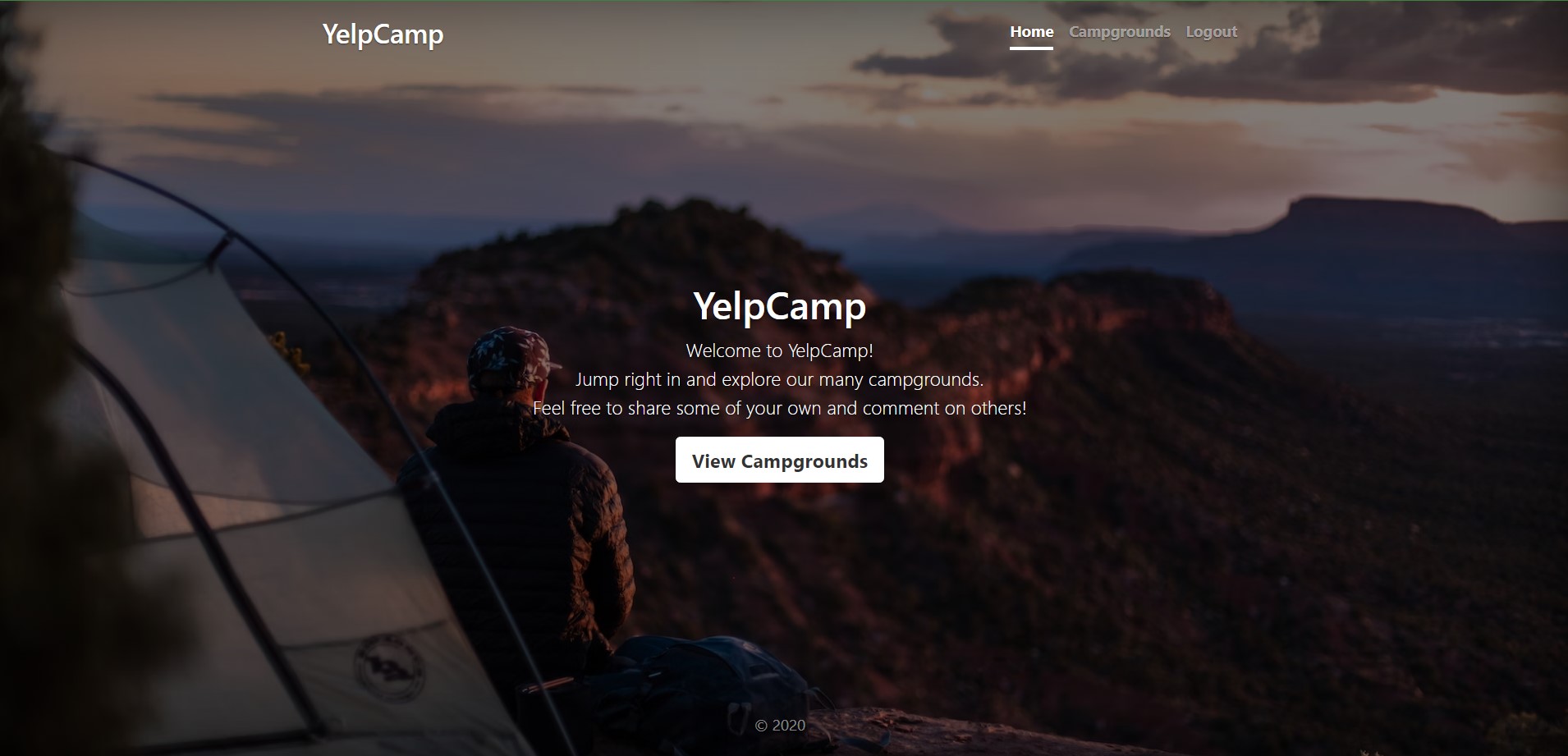
Then I opened http://<test-vm-ip>:3000/, created a user and a campground, and checked that the data appeared in Atlas and the image in Cloudinary. This environment answers one question: does the app work with real services before any automation touches it?
Dev environment: build, scan, run in Docker #
The dev environment has two VMs: one for Jenkins, Docker and Trivy, and one running SonarQube as a container.
The app’s Dockerfile is simple:
FROM node:18
WORKDIR /app
COPY package.json package-lock.json ./
RUN npm install
COPY . .
EXPOSE 3000
CMD npm start
Copying package.json and the lock file before the rest of the source is the one optimisation here: the npm install layer is cached until the dependencies change, so code-only changes rebuild fast.
Connecting Jenkins to everything #
Jenkins needs three credentials, each stored in Jenkins’ credential store and referenced by ID in the pipeline, never written into it:
- a SonarQube token (Secret text), generated in SonarQube under Administration → Security → Users → Tokens,
- a GitHub personal access token (Username with password),
- a Docker Hub access token (Username with password), not the account password.

The SonarQube Scanner, Docker and Node.js tools are configured under Manage Jenkins → Tools. Trivy has no Jenkins plugin, so it’s installed directly on the Jenkins VM and called from shell steps.
The dev pipeline #
pipeline {
    agent any
    tools { nodejs 'nodeDev' }
    environment { SCANNER_HOME = tool 'sonar-dev' }

    stages {
        stage('Git Checkout') {
            steps { git branch: 'main', credentialsId: 'git-cred', url: 'https://github.com/$GITHUB_USERNAME/YelpCampAPP' }
        }
        stage('Install Package Dependencies') { steps { sh "npm install" } }
        stage('Unit Tests')                   { steps { sh "npm test" } }
        stage('Trivy FS Scan') {
            steps { sh "trivy fs --format table -o fs-report.html ." }
        }
        stage('Sonarqube') {
            steps {
                withSonarQubeEnv('sonar') {
                    sh "$SCANNER_HOME/bin/sonar-scanner -Dsonar.projectKey=Campground -Dsonar.projectName=Campground"
                }
            }
        }
        stage('Build and Tag Docker Image') {
            steps { script { withDockerRegistry(credentialsId: 'docker-cred', toolName: 'docker-dev') {
                sh "docker image build -t $DOCKER_UNAME/camp:latest ."
            } } }
        }
        stage('Docker Image Scan') {
            steps { sh "trivy image --format table -o trivy-image-report.html $DOCKER_UNAME/camp:latest" }
        }
        stage('Push Docker Image') {
            steps { script { withDockerRegistry([credentialsId: 'docker-cred', toolName: 'docker-dev']) {
                sh "docker push $DOCKER_UNAME/camp:latest"
            } } }
        }
        stage('Docker Deployment') {
            steps { script { withDockerRegistry([credentialsId: 'docker-cred', toolName: 'docker-dev']) {
                sh "docker run -d -p 3000:3000 $DOCKER_UNAME/camp:latest"
            } } }
        }
    }
}
The order is the point: install, test, scan the source (Trivy and SonarQube), build the image, scan the image, push it, then run it. The app is then reachable at http://<jenkins-vm-ip>:3000.
Prod environment: the same image on GKE #
Production reuses the pipeline up to the push, and replaces the last stage with a deployment to GKE.
Give Jenkins access to the cluster #
On the prod Jenkins VM, fetch the cluster credentials:
gcloud container clusters get-credentials $CLUSTER --zone $ZONEJenkins deploys as a Google service account (created by Terraform). I exported a JSON key for it and uploaded the key to Jenkins as a “Google Service Account from private key” credential:
gcloud iam service-accounts keys create ~/jenkins-gke-key.json --iam-account $SA_EMAILInside the cluster, that service account gets a limited role rather than cluster-admin. This is the role and binding I used:
apiVersion: rbac.authorization.k8s.io/v1
kind: ClusterRole
metadata:
 name: robot-deployer
rules:
- apiGroups:
  - extensions
  - apps
  - v1
  resources:
  - containers
  - endpoints
  - services
  - pods
  verbs:
  - create
  - get
  - list
  - patch
  - update
  - watch
---
kind: RoleBinding
apiVersion: rbac.authorization.k8s.io/v1
metadata:
  name: restricted-rolebinding
  namespace: default
subjects:
- kind: User
  name: ${SA_EMAIL}
  namespace: default
roleRef:
  kind: ClusterRole
  name: robot-deployer
apiGroup: rbac.authorization.k8s.iokubectl create -f rbac/robot-deployer.yaml
envsubst < rbac/robot-deployer-bindings.yaml | kubectl create -f -A ClusterRole bound with a namespaced RoleBinding grants its permissions only in that namespace (default here), which is the right pattern. The role itself has problems, covered in the review.
App secrets in Kubernetes #
The four credentials become a Kubernetes Secret, which the Deployment reads as environment variables:
kubectl create secret generic yelp-camp-secrets \
    --from-literal=CLOUDINARY_CLOUD_NAME=my-cloud-name \
    --from-literal=CLOUDINARY_KEY=my-cloud-key \
    --from-literal=CLOUDINARY_SECRET=my-cloud-secret \
    --from-literal=MAPBOX_TOKEN=my-mapbox-token \
    --from-literal=DB_URL=my-db-url \
    --from-literal=SECRET=my-secret
The deploy stage #
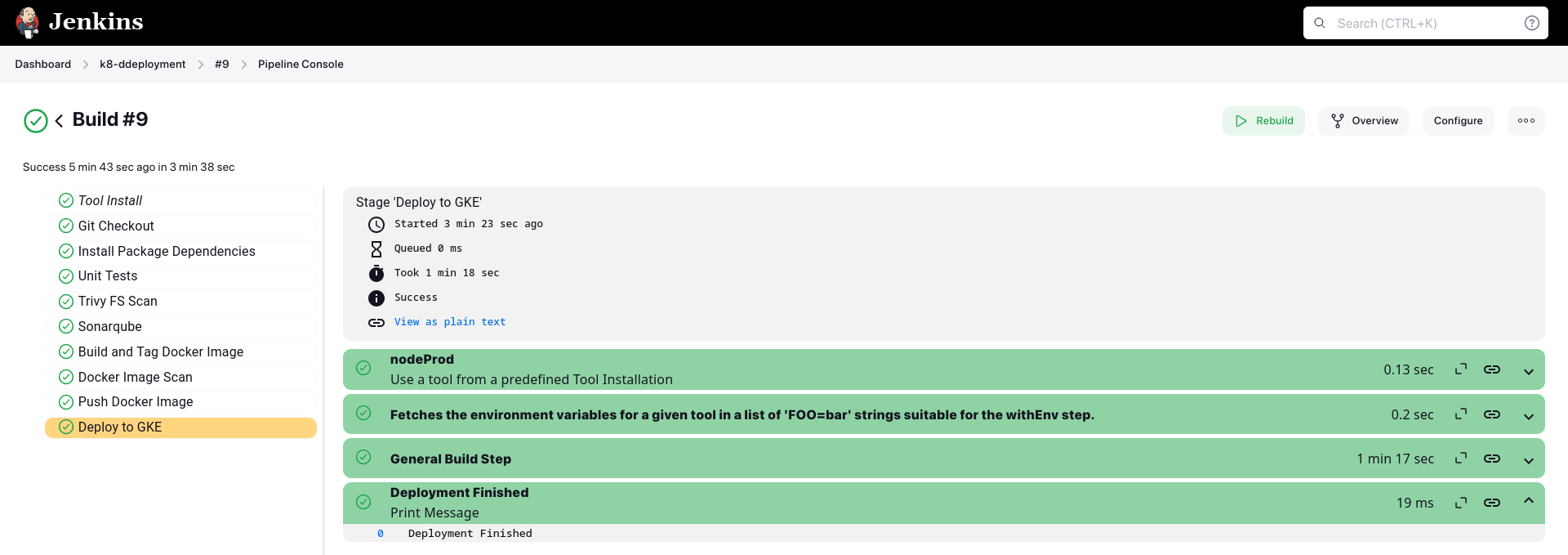
Deployment uses the Google Kubernetes Engine plugin for Jenkins. The cluster’s project, name and location are Jenkins global environment variables, so the same pipeline can target a different cluster without edits:
stage('Deploy to GKE') {
    steps {
        step([
            $class: 'KubernetesEngineBuilder',
            projectId: env.PROJECT_ID,
            clusterName: env.CLUSTER_NAME,
            location: env.LOCATION,
            manifestPattern: 'k8/deployment.yaml',
            credentialsId: env.CREDENTIALS_ID,
            verifyDeployments: true])
        echo "Deployment Finished"
    }
}
verifyDeployments: true makes the stage wait until the Deployment is actually available, so a pod that can’t start fails the pipeline instead of passing silently.
Finally I checked the pods and their logs to confirm the backend had connected to Atlas:
kubectl get pods
kubectl logs <pod-name>
kubectl describe pod <pod-name>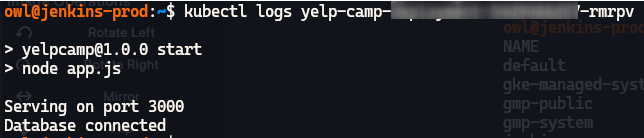
What I’d change today #
The progression from VM to container to Kubernetes is a good way to learn, and the pipeline order (test, scan, build, scan, push, deploy) holds up. These are the parts I’d do differently now.
1. The dev deploy only works once. docker run -d -p 3000:3000 starts a new container on every run, but the previous one still holds port 3000, so the second run fails. Stop and remove the old container first (or use docker compose up -d, which replaces it).
2. :latest and inconsistent image names. Every build is camp:latest, so GKE can’t tell a new image from the old one and a rollback has nothing to name. The prod pipeline also uses $DOCKER_USUSERNAME and $GH_USUSERNAME, which don’t match the dev pipeline’s variables. I’d tag images with the commit SHA and define the image name once.
3. The deploy role doesn’t fit Deployments. robot-deployer lists v1 as an API group (the core group is "") and containers as a resource (it isn’t one), and it doesn’t include deployments, which is what the pipeline applies. Deployments worked only because a custom IAM role on the project (in the repo’s configs/GKE/rbac/IAMrole.yaml) also granted container.deployments.*, and on GKE, IAM permissions apply to the whole cluster. So the narrow Kubernetes role was never what limited the account. The role should grant get, list, create, update and patch on deployments (group apps) and services (group ""), in one namespace. I’d also drop the step that gives my personal account cluster-admin.
4. Long-lived service account keys. A downloaded JSON key never expires unless someone rotates it, and here it lives on a VM and in Jenkins. Today I’d run the CI on GCP with an attached service account, or use Workload Identity Federation, so no key file exists.
5. The database is open to the internet. The Atlas allowlist was 0.0.0.0/0, so anyone with the connection string could try to connect. Restrict it to the cluster’s egress IP (a Cloud NAT gateway gives a fixed one), or use private networking to Atlas.
6. One VPC and one firewall for every environment. Test, dev and prod share a network and the same wide firewall rules (SSH and the Kubernetes and app port ranges, from anywhere). A problem in test can reach prod. I’d give each environment its own VPC or project, and close admin ports to the internet.
7. Secrets created by hand. kubectl create secret --from-literal puts every secret in shell history, and the Secret exists only in the cluster, so rebuilding the cluster means retyping them. I’d store them in Secret Manager and sync them into the cluster with the External Secrets Operator or the Secret Manager CSI driver.
8. An old Node.js image running as root. Node.js 18 reached end of life in April 2025. I’d move to a current LTS image, use npm ci for reproducible installs, add USER node, and use a multistage build so the dev dependencies stay out of the runtime image.
9. The scans don’t block anything. As in my secure CI/CD project, Trivy and SonarQube write reports but never fail the build. Add --exit-code 1 for high and critical findings, and wait for the SonarQube quality gate.
Architecture takeaways #
Promote the artifact, not the source #
The best idea in this project is that dev and prod deploy the same container image. The weak point is that :latest makes “the same image” unverifiable. Build once, tag immutably, and promote that exact tag from environment to environment, so what you tested is provably what you shipped.
Isolate environments by blast radius #
Separate folders in Terraform made the environments look separate, but they shared a network, firewall rules and a database allowlist. Real isolation means separate VPCs or projects, separate service accounts and separate credentials, so a mistake or a compromise in test can’t touch production.