

My portfolio site is built with Hugo, a static site generator. The output is a folder of HTML, CSS and images, which any web server can serve. But my first Docker image for it was 434 MB, because it carried everything needed to build the site as well as everything needed to serve it.
This post walks through the two Dockerfiles I wrote: a single-stage one that worked but was heavy, and a multistage one that brought the image down to 61 MB, an 86% reduction. The code is in hugo-portfolio-multistage-docker.
Images, layers and why size matters #
A Docker image is a stack of read-only layers. Most Dockerfile instructions that change the filesystem (RUN, COPY, ADD) add a layer, and the final image is every layer stacked together. Docker caches layers, so when you rebuild, only the layers after the first changed instruction are rebuilt.
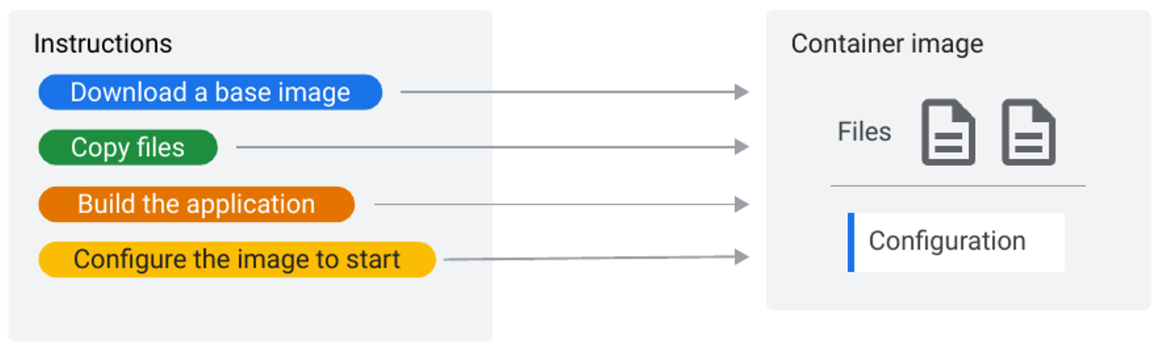
One consequence catches people out: deleting a file in a later layer doesn’t make the image smaller. The file still exists in the earlier layer, and the later layer just hides it. So installing build tools and removing them afterwards, in separate RUN instructions, saves nothing.
Large images cost you in three ways:
- Slower pulls and deploys, because every node has to download them.
- More storage in registries and on every host.
- A bigger attack surface. Every compiler, package manager and library in the image is something a vulnerability scanner will flag and an attacker could use.
The single-stage Dockerfile: 434 MB #
The site needs Hugo to build, and Node.js with PostCSS for the theme’s CSS processing. Then it needs a web server. My first Dockerfile did all of that in one image:
FROM golang:alpine

# Set the working directory
WORKDIR /app

# Copy your Hugo project files
COPY . .

# Install Hugo and compatibility libraries
RUN apk add --no-cache hugo libc6-compat libgcc libstdc++

# Install Node.js and npm
RUN apk add --no-cache nodejs npm

# Install PostCSS for Hugo
RUN npm install -g postcss-cli

# Generate your website's static content
RUN hugo

# Install NGINX
RUN apk add --no-cache nginx

# Optional: Copy your custom Nginx configuration if needed
# COPY nginx.conf /etc/nginx/nginx.conf

# Remove Hugo and any build dependencies (optional, for size reduction)
RUN apk del --no-cache hugo

# Expose the port NGINX uses
EXPOSE 80

# Command to start NGINX when the container runs
CMD ["nginx", "-g", "daemon off;"]
It works: it builds the site with hugo, then serves the public/ folder with NGINX. But look at what ends up in the final image: the Go toolchain from the golang:alpine base, Node.js and npm, PostCSS and its dependencies, the full project source, and NGINX. The apk del hugo line at the end doesn’t help, for the layer reason above: Hugo is still in the earlier layer.
docker build -f Dockerfile.dev -t my-hugo-site:dev .
docker images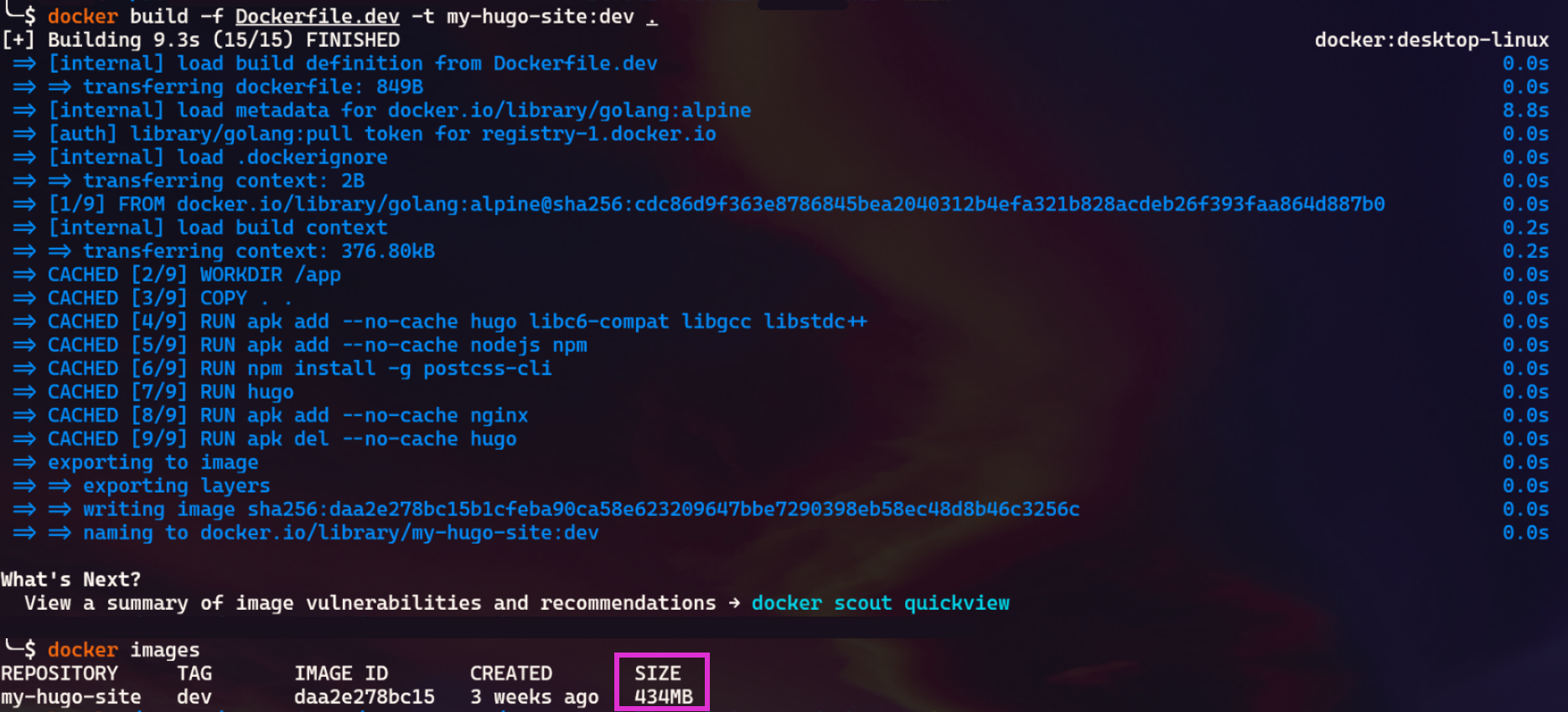
The multistage Dockerfile: 61 MB #
A multistage build uses more than one FROM in the same Dockerfile. Each FROM starts a fresh stage, and a later stage can copy files out of an earlier one with COPY --from. Only the last stage becomes the image. Everything else, including every tool used to build, is thrown away.
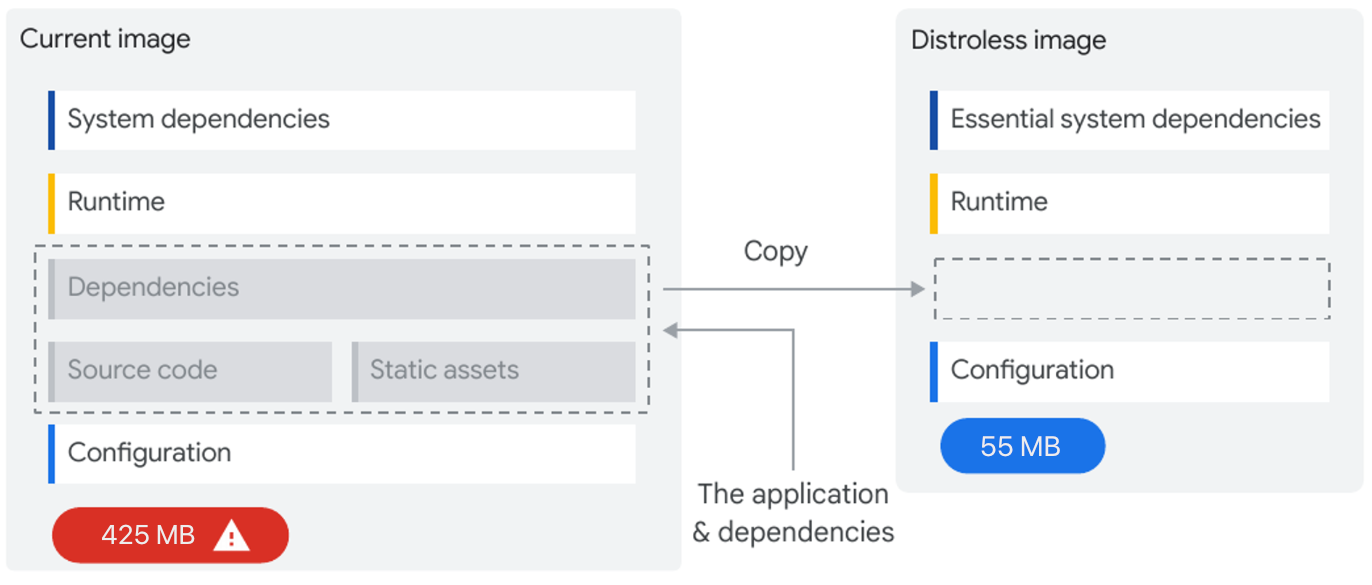
For a static site, the split is obvious: stage 1 builds the site, stage 2 serves it.
# Stage 1: Build Stage
FROM golang:alpine AS build

# Set the working directory within the container
WORKDIR /app

# Copy your Hugo project files
COPY . .

# Install Hugo
RUN apk add --no-cache hugo

# Install Node.js and npm (npm includes npx)
RUN apk add --no-cache nodejs npm

# Install PostCSS
RUN npm install -g postcss-cli

# Generate your website's static content
RUN hugo

# Stage 2: Web Server Stage
FROM nginx:alpine

# Set NGINX's default serving directory
WORKDIR /usr/share/nginx/html

# Copy the generated static website from the build stage
COPY --from=build /app/public /usr/share/nginx/html

# Optional: Copy your custom Nginx configuration if needed
# COPY nginx.conf /etc/nginx/nginx.conf

# Expose the port NGINX uses
EXPOSE 8080

# Command to start NGINX when the container runs
CMD ["nginx", "-g", "daemon off;"]

#env var
ENV NODE_ENV=production \
HOSTNAME="0.0.0.0" \
NEXT_TELEMETRY_DISABLED=1
Stage 1 (build) is the same as before, minus NGINX: install Hugo, Node.js and PostCSS, copy the source, run hugo. The result is the generated site in /app/public.
Stage 2 starts again from nginx:alpine, a small official NGINX image, and copies in only /app/public. No Go, no Node.js, no PostCSS, no source code.
docker build -f Dockerfile.prod -t my-hugo-site:prod .
docker images
The result #
| Image | Size | What’s in it |
|---|---|---|
Single-stage (dev) |
434 MB | Go toolchain, Node.js, npm, PostCSS, source, NGINX, site |
Multistage (prod) |
61 MB | NGINX and the generated site |
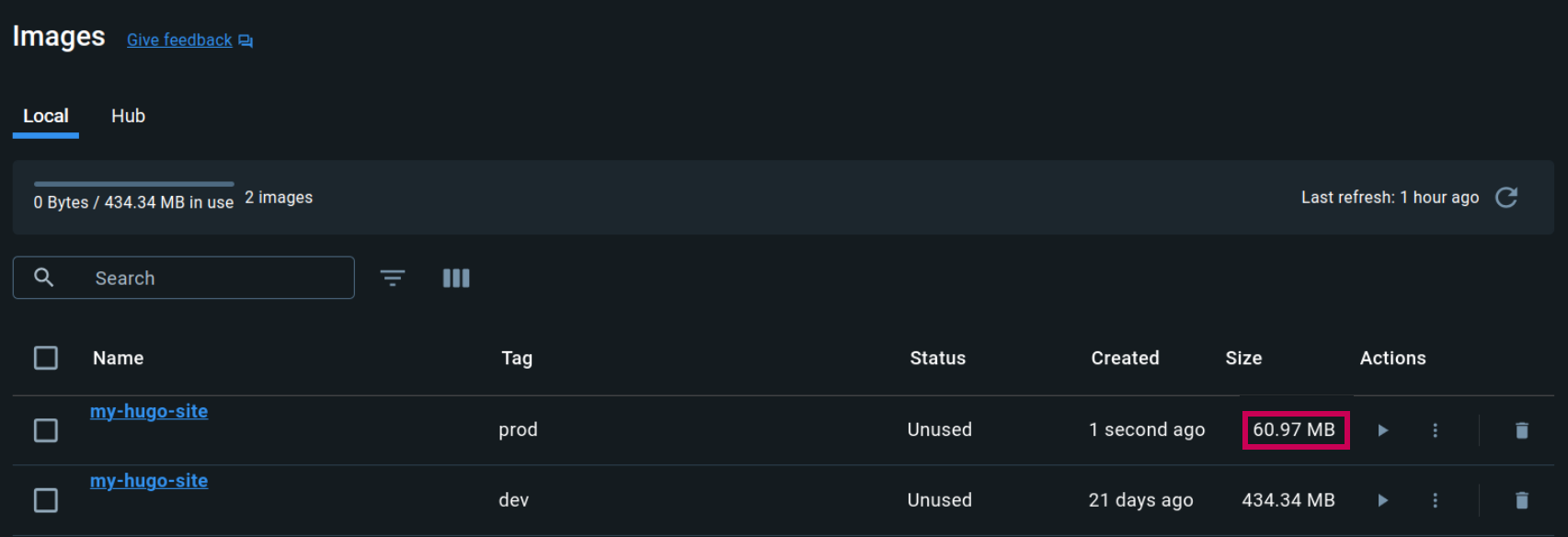
The approach applies well beyond Hugo. Any project where the build needs tools that the runtime doesn’t (compiled languages, front-end bundlers, static site generators) can split the same way: one stage with the toolchain, one stage with only the output.
What I’d change today #
Looking at this Dockerfile two years later, the multistage idea holds up, but several details don’t. I’ve left the code above as I built it, and listed the fixes here.
- The port doesn’t match.
nginx:alpinelistens on port 80, but the final stage saysEXPOSE 8080.EXPOSEis only documentation, so it still works, but it documents the wrong port. Either expose 80, or switch to an image that really listens on 8080 (see the next point). - It runs as root. The official NGINX image starts as root. I’d use
nginxinc/nginx-unprivileged, which runs as a normal user and listens on 8080, so a compromise of the web server doesn’t start with root inside the container. - Nothing is pinned.
golang:alpineandnginx:alpinemove with every release, and the Alpinehugopackage version depends on when you build. Pin the base images to a version (better, a digest) and the Hugo version, so the same commit always builds the same image. - The build stage doesn’t need Go. Hugo is a single binary. A Hugo image (such as
hugomods/hugo) or plainalpineis a smaller, faster build stage. - The
ENVblock is a leftover.NODE_ENV,HOSTNAMEandNEXT_TELEMETRY_DISABLEDare settings for a Next.js app, copied from somewhere else. They do nothing for NGINX serving static files. Delete them. - Add a
.dockerignore.COPY . .sends everything to the build, including.git/and any localnode_modules/. Excluding them makes builds faster and stops anything private in the folder reaching the image. - Scan the result. A vulnerability scan (for example with Trivy) in the pipeline makes the attack-surface argument measurable instead of assumed.
My portfolio’s current Dockerfile already picks up some of these: it builds with a pinned hugomods/hugo image, serves from a pinned nginx:1.28-alpine, and adds a health check. It still runs as root, so point 2 is next.
Architecture takeaways #
Separate build time from run time #
A build needs compilers, package managers and source code. A running service needs none of them. Treating those as two environments, with a narrow, explicit handoff between them (here, one COPY --from), is what makes the runtime small. The same idea shows up in CI pipelines that build an artifact once and promote that exact artifact through every environment.
Smaller is a security property, not just a performance one #
Every package in a runtime image is something to patch, something a scanner reports, and something an attacker can use after getting in. Removing what the service doesn’t need shrinks all three at once, and costs nothing at run time.


