

Project Aether lives in three places. The hypervisor and the K3s cluster are on a laptop at home, behind my ISP’s carrier-grade NAT. The app host is an Oracle Cloud ARM VM in Mumbai. The DMZ observer is a Google Cloud e2-micro in Iowa with no public IPv4 address at all. They have to talk to each other constantly: Prometheus on the app host scrapes the cluster, the cluster ships logs to Loki on the app host, the observer probes everything from outside, and I need to reach all of it from my phone.
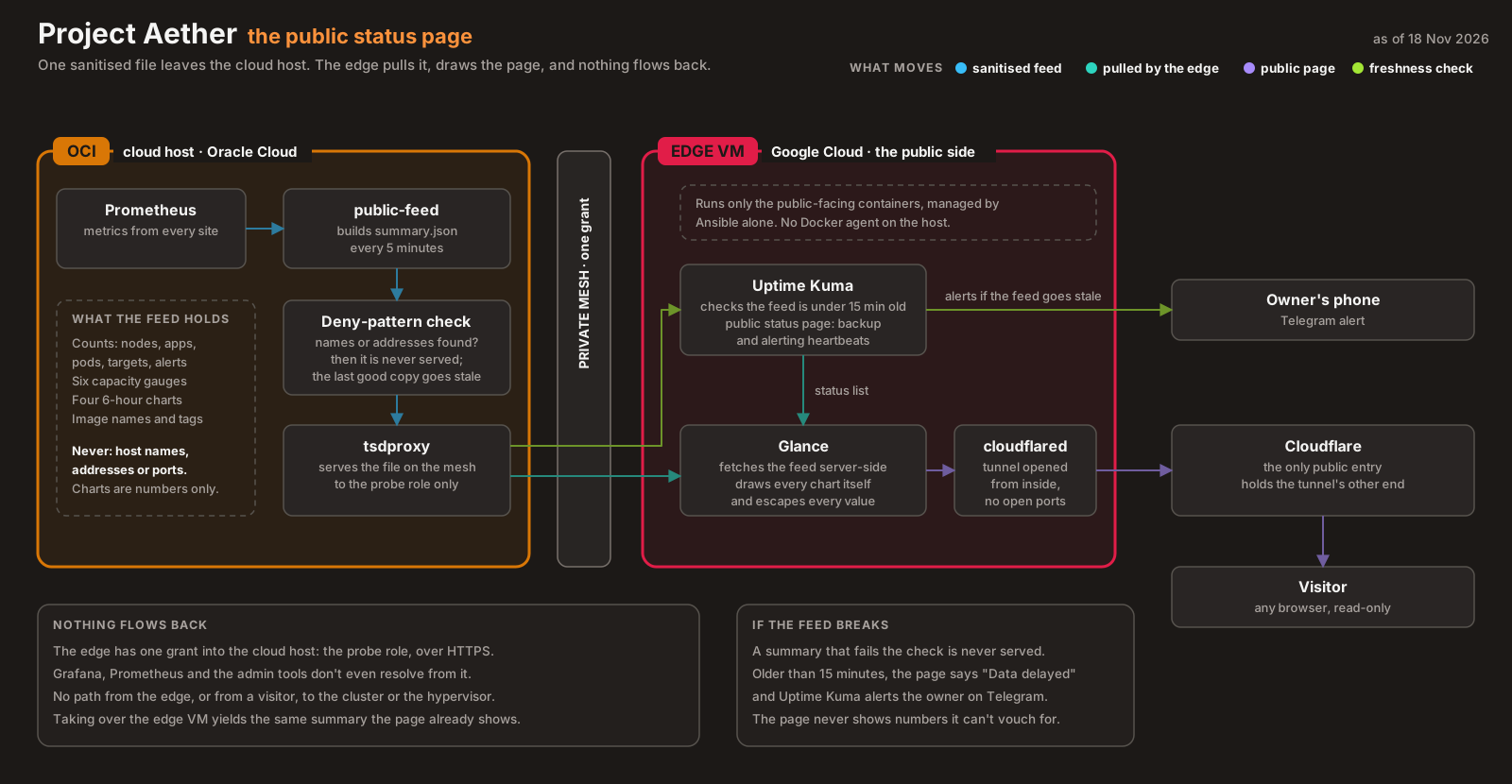
None of those machines accepts an inbound connection from the internet that isn’t WireGuard. There is no port forwarding at home and no public SSH in either cloud. The few things that are public on purpose, like a read-only status page, go out through outbound-only tunnels, and I’ll list them below.
This post covers how that works, what the access policy looks like now that it’s no longer allow-all, and three things the network did that I didn’t expect once it was locked down. Two of them are covered in depth in The Tag That Meant Two Things. The third, a worker that silently fell back to a relay for eleven hours, is new.
The problem #
The home connection is the hard constraint. My ISP puts customers behind carrier-grade NAT, so the router’s “public” address isn’t public, and there’s nothing to forward a port from. In practice it’s worse than one NAT: the home router does NAT too, so traffic from the lab crosses two of them before it reaches the internet.
That rules out the usual options. I looked at two and rejected both (ADR-004):
| Option | Why not |
|---|---|
| Port forwarding on the router | Fails behind CGNAT, and even where it works it’s an unauthenticated door from the internet into the LAN |
| Cloudflare Tunnel | Solves “no open ports”, but it publishes services to the public internet. I needed private operator access to nodes, not public ingress |
| Tailscale (chosen) | WireGuard tunnels between peers, NAT traversal built in, a relay fallback when traversal fails, and stable names through MagicDNS |
The cost is a dependency on Tailscale’s coordination service. If it goes down, existing tunnels keep passing traffic, but new nodes can’t join. For a homelab on the free personal plan, I took that trade.
What’s exposed, place by place #
Every machine runs tailscaled, installed by Ansible during bootstrap, so joining the tailnet is part of building a node, not a step afterwards. Here is what each place exposes to the internet:
- The homelab: nothing. It sits behind two NATs and makes only outbound connections.
- The app host: one UDP port for WireGuard, plus ICMP “fragmentation needed” so path MTU discovery works. Public SSH was removed. I reach the host over the tailnet. If the tailnet is down, the break-glass path is the OCI serial console, or re-adding SSH from my own IP for the duration.
- The DMZ observer: no public IPv4, and GCP’s default rule drops all inbound traffic that no rule allows. ICMPv6 is allowed for diagnostics, and one break-glass rule admits SSH from Google’s Identity-Aware Proxy range, so who can use it is decided by Google IAM rather than by network address.
The app host’s security list in Terraform is short enough to read in full. This is the part that matters:
  # No public SSH (FND-04). Operators reach the host over the tailnet; sshd is
  # hardened in oci-base.yml. Break-glass: re-add TCP 22 from your own IP in
  # the OCI console (Networking > Security lists), or use the serial console.

  # Tailscale direct paths. ...
  ingress_security_rules {
    protocol    = "17"
    source      = "0.0.0.0/0"
    source_type = "CIDR_BLOCK"
    stateless   = false
    description = "Tailscale WireGuard (direct paths)"
    udp_options {
      min = 41641
      max = 41641
    }
  }
That UDP rule wasn’t there at first. It’s the fix for the third surprise below, and it’s safe to open to the world because WireGuard drops any packet that isn’t authenticated with a known key. An unauthenticated scanner gets no response at all.
The DMZ’s SSH rule has a story of its own. From the start, it allowed port 22 from Tailscale’s IPv6 range, which looks sensible and could never match. Tailnet traffic arrives at the VM as encrypted WireGuard packets from a public address and is decrypted on the node itself, so the cloud firewall never sees a tailnet address. Everyday SSH needs no cloud rule at all, because it travels inside WireGuard. The rule was replaced with the IAP break-glass rule in November (ADR-013 addendum).
What is public, on purpose #
“No open ports” doesn’t mean nothing is public. A few things are, deliberately, and each one is narrow (ADR-004 addenda):
- A read-only status page, served from the DMZ through a Cloudflare Tunnel.
cloudflaredmakes an outbound connection to Cloudflare, so no inbound port opens, and the tunnel routes one hostname to one container. - A webhook endpoint for GitHub, on the same tunnel. It forwards one path to ArgoCD so a push syncs in seconds, and a Cloudflare rule blocks every source outside GitHub’s published webhook ranges. A valid webhook can only make ArgoCD re-read Git.
Everything else that answers from the internet would be a defect.
From allow-all to grants #
At first, the tailnet ran an allow-all policy: every node could reach every node on every port. Once the network held two public clouds and a private cluster, that meant a compromised cloud VM could have reached the hypervisor’s web UI.
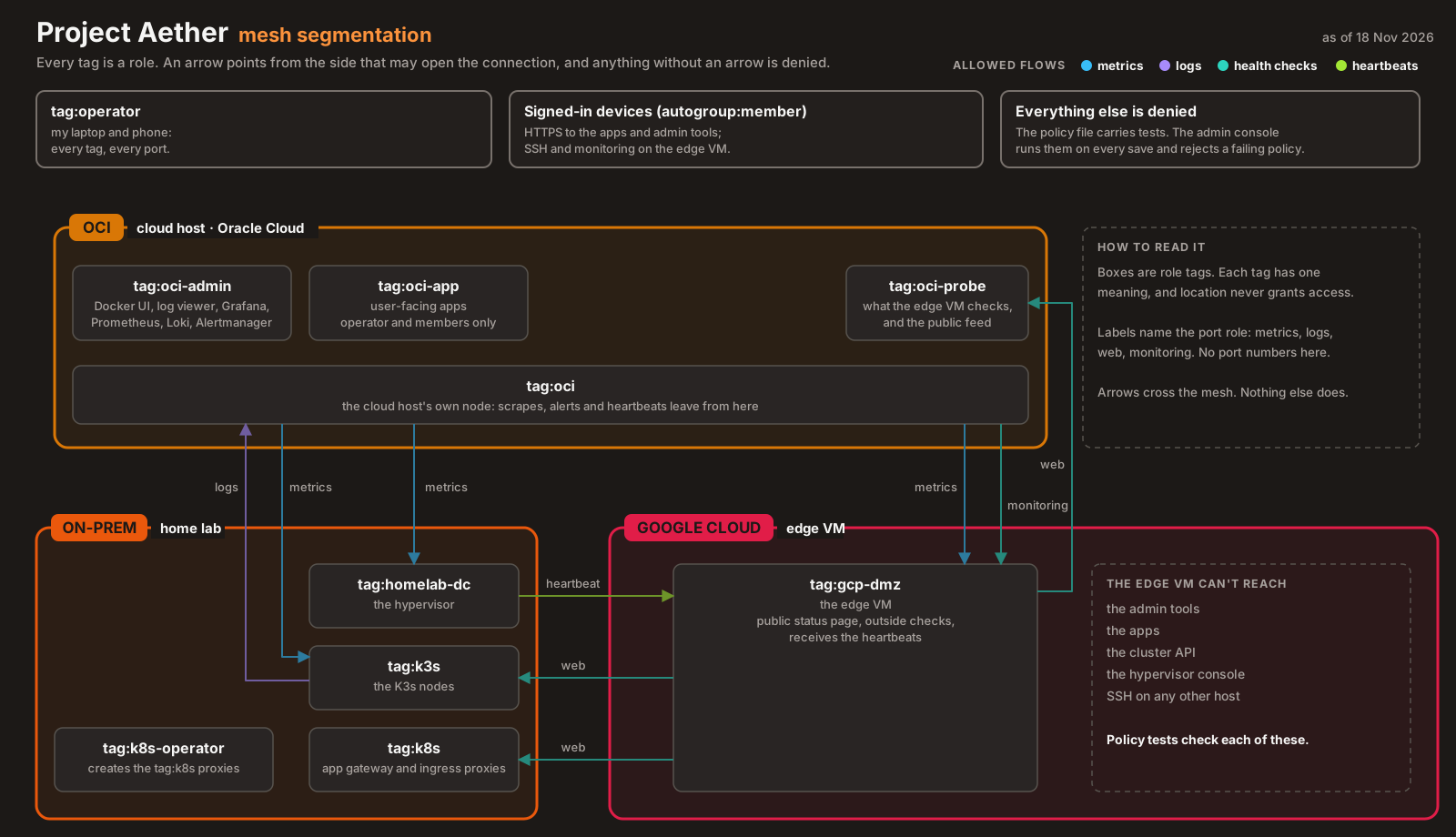
ADR-013 replaced it with Tailscale grants: deny by default, then explicit rules from a source tag to a destination tag on named ports. I picked grants over host firewalls because the hosts run three different operating systems, and three firewall configs would drift. One central policy, kept in Git (SOPS-encrypted, since it’s a map of the network), doesn’t.
The rules are deliberately asymmetric. The policy’s own tests state them, and the admin console runs those tests on every save:
- The DMZ observer may reach the services it probes on 443, and nothing else: not admin tools, not the K3s API, not the Proxmox UI.
- The app host may scrape metrics ports in the cluster and reach the observer’s monitoring ports. It may not reach the K3s API or SSH.
- The K3s nodes may reach exactly one thing on the app host: Loki.
- The hypervisor may reach only the observer’s heartbeat port.
- My operator devices may reach everything.
Each line answers one question: if this machine were compromised, what could it reach? For the observer, the least-trusted machine on the network, the answer is “a handful of health-check endpoints”.
Surprise 1: deny-by-default is quiet #
The first time the policy blocked something it shouldn’t have, nothing said “denied”. The observer’s app-host monitors passed 0 of about 2,600 checks over three days, and the error was “no such host”.
Tailscale only tells a node about the peers its policy lets it reach. If no grant connects two nodes, each one is simply absent from the other’s network map, so MagicDNS has nothing to resolve. A block looks exactly like a machine that doesn’t exist (INC-2026-002).
That’s good for security. It’s terrible for debugging if you don’t know it. When a tailnet name stops resolving, check the policy before you check DNS.
Surprise 2: a tag for a place is not a role #
The quick fix for the blind observer was to give every app-host service the app host’s tag. The observer had a grant to that tag on 443, so monitoring came back. So did access to my Docker UI and log viewer, because they now carried the same tag (INC-2026-003).
The tag meant two things: “runs on OCI” and “the DMZ may reach this”. The fix gave each tag one meaning. One tag marks services the observer may probe, one marks admin tools that only my devices reach, and the location tag is now carried only by the host’s own node.
Surprise 3: on the tailnet doesn’t mean a direct path #
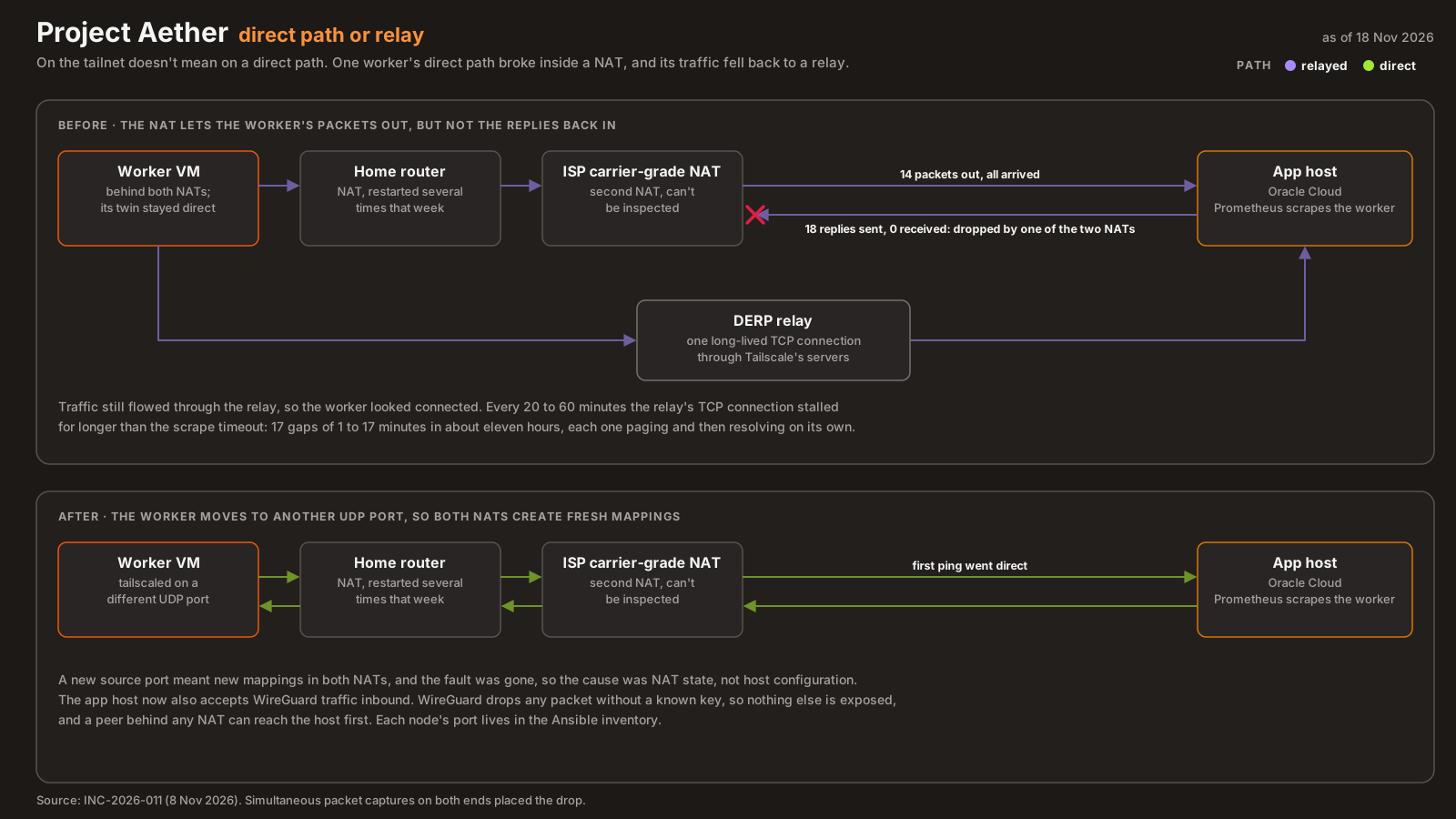
This one came on 8 November, after the lab had been off overnight. One worker’s metrics started dropping out: 17 gaps of 1 to 17 minutes over about eleven hours, each one paging and then resolving on its own (INC-2026-011). The other worker, on the same LAN behind the same NAT, was fine.
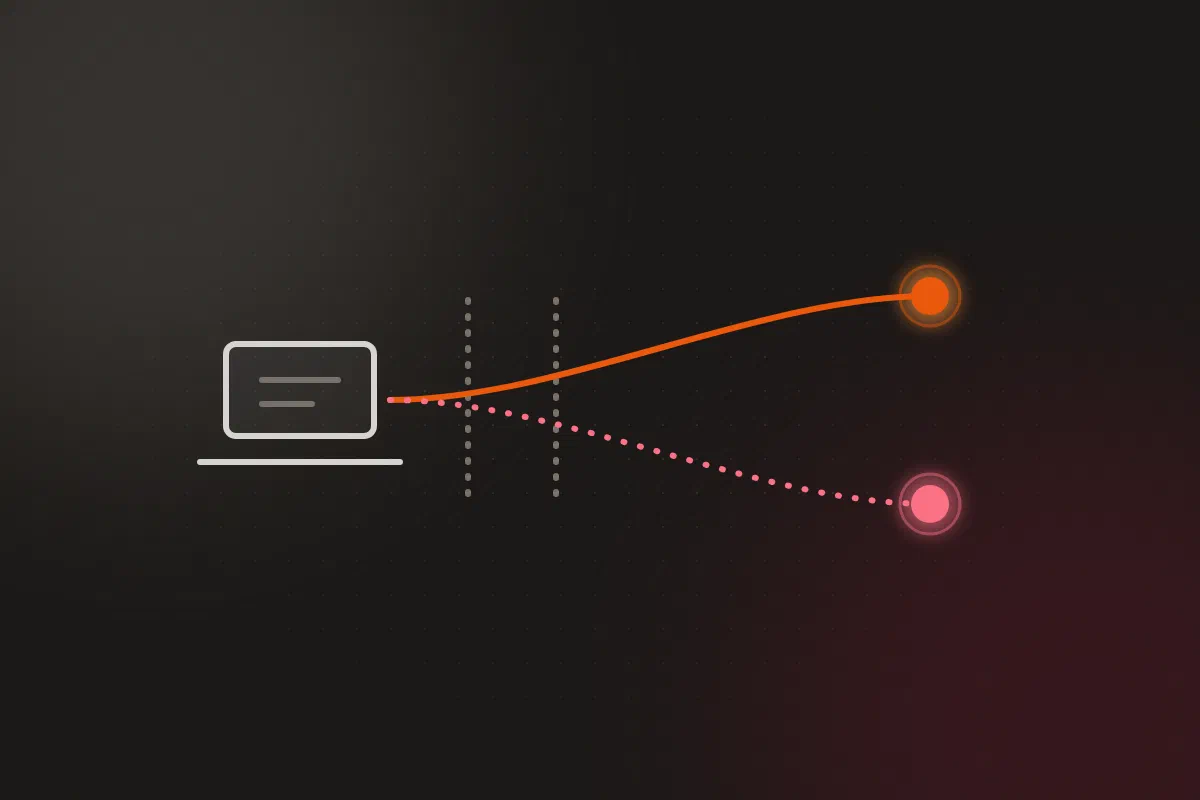
tailscale ping from the worker to the app host gave the answer: “via DERP, direct connection not established”. When two peers can’t punch a direct UDP path through their NATs, Tailscale falls back to a DERP relay, a long-lived TCP connection through Tailscale’s servers. Traffic still flows, so everything looks connected. On my line, that TCP connection stalled every 20 to 60 minutes for longer than the scrape timeout.
What I tried, in order:
| Step | Result |
|---|---|
Restart tailscaled on the worker |
Still relayed |
| Open UDP 41641 inbound on the app host (security list and host firewall) | The worker’s packets now reached the app host. Still relayed |
| Capture on both ends at once | 14 packets left the worker and arrived; 18 replies left the app host; the worker received none |
Move the worker’s tailscaled to UDP 41642 |
First ping went direct |
The simultaneous capture settled it. One of the two NATs on the home side was holding a broken mapping for that worker’s source port: packets could go out, but replies couldn’t come back in. The home router had been restarted several times that week, which churns NAT state. A new source port meant new mappings in both NATs, and the fault was gone. I can’t tell which NAT held the bad entry, since only the home router is mine to inspect.
Both changes stayed. The app host keeps UDP 41641 open, so a peer behind any NAT can reach it first, and each node’s Tailscale port lives in the Ansible inventory:
    # tailscale_port defaults to 41641. A node can override it in the inventory
    - name: Set tailscaled's UDP port
      ansible.builtin.lineinfile:
        path: /etc/default/tailscaled
        line: 'PORT="{{ tailscale_port | default(41641) }}"'
The monitoring did its job here. It reported a flapping transport accurately. The trouble is what a day of self-resolving pages does to you: by the evening, a real node-down alert would have looked like noise.
What I learned #
- A denied peer is an invisible peer. In Tailscale, “no such host” on a MagicDNS name usually means the policy, not DNS. (INC-2026-002)
- A grant to a location tag is a grant to everything that ever lands there. Grant to roles, and put the boundary in the policy’s tests. (INC-2026-003)
- Check for “via DERP” whenever tailnet traffic flaps. Connected and direct are different states. (INC-2026-011)
- When two identical hosts behind one NAT behave differently, suspect NAT state. A new source port is a cheap, reversible test.
- Capture at both ends at once before blaming the network in between.
Architecture takeaways #
Shrink the public surface to one authenticated port #
The goal was never “no open ports” for its own sake. It was “nothing answers an unauthenticated stranger”. One UDP port that silently drops anything without a valid WireGuard key meets that goal better than a closed port that forces traffic through a flaky relay. Judge exposure by what a stranger can get back, not by the count of open ports.
Write access as answers to “what if this machine is compromised?” #
The asymmetric grants are a blast-radius table. The least-trusted machine can reach the least, cloud VMs can’t reach the hypervisor or the cluster API, and only my own devices reach everything. Writing each rule as “this source may reach only these things” made the tests easy to write, because each test is the same sentence turned into an assertion.
A secure default needs a loud failure mode #
Deny-by-default fails closed, which is right, but it also fails quietly: the denied peer just disappears. The same is true of the relay fallback, which fails “open” into a slower, flakier path without saying so. In both cases the fix was a check that makes the quiet state visible: policy tests that run on every save, and tailscale ping that reports “via DERP”. A planned alert on peers that stay relayed for more than 30 minutes is the next one.
An overlay hides its transport until it doesn’t #
From inside the tailnet, every node is one hop away, at a stable name and address. Underneath, the path might be a direct UDP flow, or a TCP connection through a relay server. The abstraction is worth having, but measure what’s under it. The scrape gaps on 8 November were the transport showing through the overlay.
Previously in the series: Green Is Not a Status, five ways my backups reported success while failing. Every part is listed on the series page.